
Wavemorph
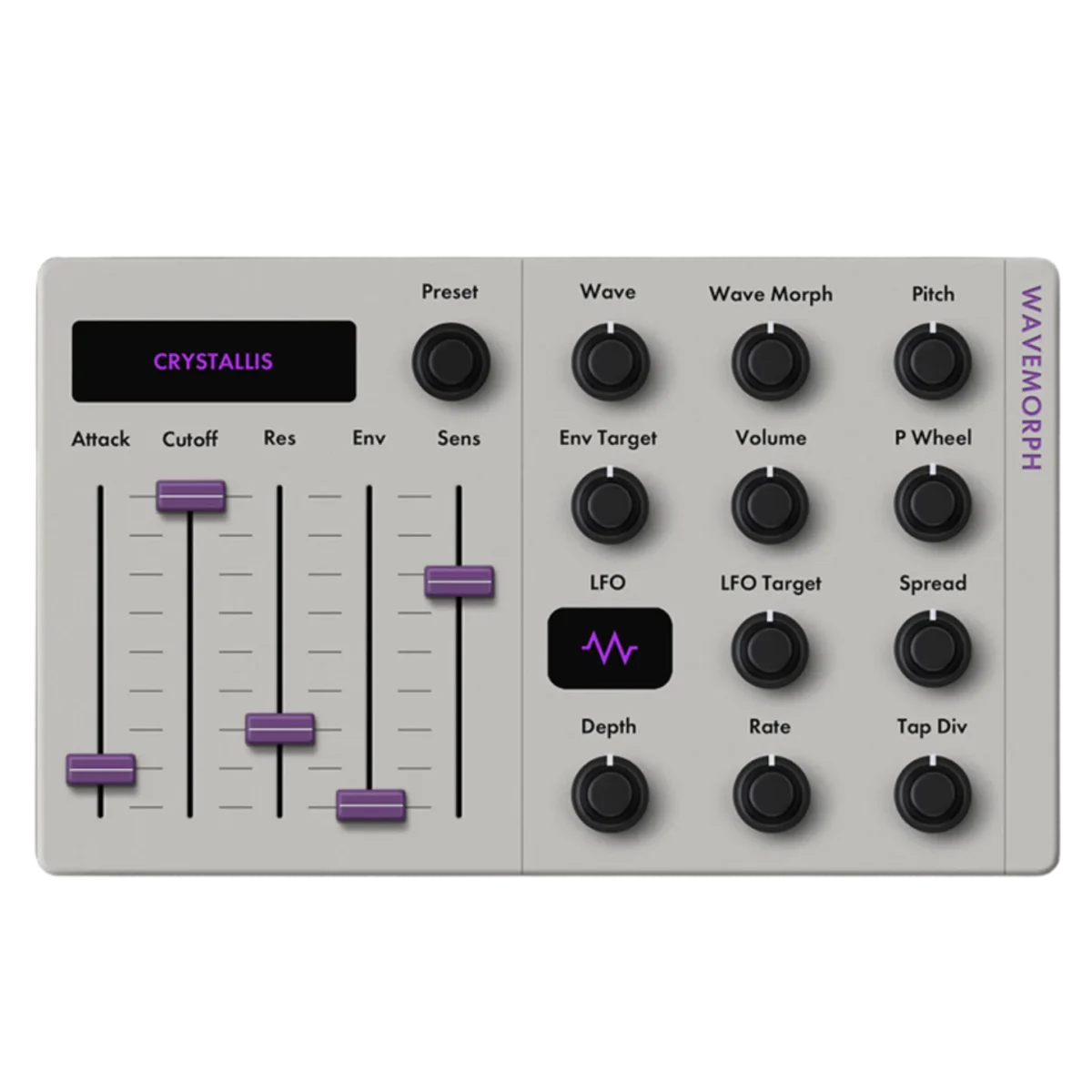
Wavemorph is a unique modulation effect found exclusively in the Fender Tone Master Pro multi-effects unit. It offers advanced waveform morphing capabilities, allowing users to blend and transition between different modulation wave shapes for dynamic and evolving effects. This pedal is designed to provide a wide range of sonic textures, from subtle movement to complex, rhythmic modulation, making it suitable for experimental and ambient guitar tones. Its integration within the Tone Master Pro platform ensures deep editing and flexible routing options.
Fender Model Guide
Continuously morphs between waveform shapes to create evolving textures, animated timbres and expressive synthesizer sounds that respond dynamically to playing input and modulation sources.
- PRESET Selects from a list of factory presets designed by Fender specifically for the this synth. Any preset modified by the user will revert to showing “Custom” in the preset list.
- ATTACK Adjusts attack time of synth notes. Set to 0 for plucky transients and turn up to engage swell on note onsets.
- CUTOFF Adjusts internal lowpass filter cutoff frequency.
- RES Adjusts resonance or Q-factor of the synth’s internal lowpass filter.
- ENV Sets depth that the target of the envelope will be modulated due to the energy envelope of the guitar signal. Set target control to a low value to make the envelope action more obvious.
- SENS Sets sensitivity of the energy envelope tracking. Higher values will cause the filter cutoff to move more responsively to the input; lower values will have less envelope destination movement.
- WAVE Selects synth oscillator waveform shape. In Wavemorph’s case, different shape options provide access to a suite of tones that can be indexed using the “Morph” control. The shapes are designed such that the waveform can be changed with the morph control in real-time to create interesting sonic textures.
- MORPH Lets the user manually index or “morph” through various shapes stored within a given waveform. The user can either scroll through the morph manually, tie an expression pedal to the control, or just let the ENV/LFO do the work for on-the-fly expressive wave morphing.
- PITCH Adjusts oscillator waveform pitch.
- ENV TARGET Selects target destination for the envelope tracker. Options include Morph, Cutoff and Morph+Cut off. This control will decide which of those synth features are modulated by the guitar’s input signal energy.
- VOLUME Adjusts synth master volume.
- PITCH WHEEL Provides a control for manually sweeping pitch by an octave both upward and downward. TIP: Connect an expression pedal to this control for on-the-fly synth pitch bends.
- LFO SHAPE Selects low-frequency oscillator waveform shape.
- LFO TARGET Chooses destination for LFO modulation to target. Options include Morph, Cutoff, Morph+Cutoff, Synth Pitch and Synth Volume.
- SPREAD Adjusts synth output stereo field spread.
- LFO DEPTH Adjusts modulation depth applied by the LFO.
- LFO RATE Adjusts speed in Hertz of the LFO.
- LFO TAP DIV Sets note division applied to the LFO rate. This syncs to the BPM setting of the TMP.
- FREEZE MODE Select operation mode for synth freeze functionality. Refer to Arctic/Antarctic Sustainer guide for more info on how to use this feature (pages 95-96).
- FREEZE Engages freeze functionality to capture current synth signal and sustain indefinitely (works differently in different modes).
- GLISS Adjusts pitch slide time between frozen synth sounds.
- MIX Controls blend between input guitar signal and output synth signal.
From the Fender Tone Master Pro Model Guide
- Based on
- Tone Master Pro Exclusive Wavemorph
- Effect type
- Synth
- Real gear released
- 2025
Unofficial fan reference by Worship Calling. Not affiliated with or endorsed by Fender. Tone Master Pro is a trademark of Fender Musical Instruments Corporation. Other product names belong to their owners and are used only to identify the gear each model is based on. Details are a guide, so check the Fender manual for exact controls.